UpDraft+ is a free back-up plugin that can be configured to automate retention requirements and have copies emailed to your IT team. NOTE – Crons may cause high usage on low-end hosting plans. https://wordpress.org/plugins/updraftplus/
Restrict User Access – WP Admin No Show
WP Admin No Show is a plugin that keeps end-users out of the back-end of your tool and restricts the ability to change configuration settings. https://wordpress.org/plugins/wp-admin-no-show/
Restrict User Access – Hide Admin Bar
Hide Admin Bar is a plugin to remove the admin bar from front-end view. This is very useful if you are installing 3rd party plugins that may not have embedded access control. https://wordpress.org/plugins/hide-admin-bar/
Generating a GCPT installation is quick and easy with most shared web hosting providers, but can generally run on any general LAMP, LEMP, or other web server stack. Unlike many public health tools, the GCPT is self-hosted, which means that you own your data, and can move or modify your installation at any time, and scale your platform as it grows.
Many shared web hosting providers even offer 1-click installations of WordPress (the primary platform upon which the GCPT is built), allowing you to be ready to install the GCPT in less than 5 minutes.
For those that are unfamiliar with web hosting, the process is very easy and generally goes as follows:
Sign up for a shared web hosting provider.
Purchase a domain name (i.e.; mygarrettcounty.com) – this can usually be done through your web host for convenience if you do not have a preferred registrar.
Point your domain name at your web host – usually not necessary if you purchase your domain with your web host.
Use Softaculous (or a similar 1-click installation wizard, if available) to install WordPress, or download WordPress from https://wordpress.org/download/.
Choose a WordPress theme (works best natively with BuddyPress compatible themes).
Install the GCPT dependencies as directed in this tutorial.
Install the GCPT platform.
Customize your GCPT , and launch your community collaborative!
While this process may vary by web host, it generally takes 10-45 minutes, depending on experience.
What is WordPress/BuddyPress?
WordPress is the world’s most popular Content Management System (CMS), and now powers over 30% of the entire Internet*! Content Management Systems allow end-users, just like you, to easily update and edit website content without knowing any code or specialized technological skills.
The Garrett County Planning Tool is a community engagement framework that includes WordPress plugins that extend a major component plugin called BuddyPress.
BuddyPress is an open source WordPress plugin that allows your community members to create accounts, to be grouped into categories, and to have custom profiles. The Garrett County Planning Tool further enhances these functions with many, many tools specifically designed for Public Health and community engagement – these include hyper local data collections, health improvement strategy development and endless ways to engage and track your community’s health improvement efforts.
Since WordPress is the most popular Content Management System on the Internet, it’s no surprise that there are literally THOUSANDS of installation tutorials! In fact, WordPress has been so refined over the years, that it’s become famous for its well-known 5-minute installation.
For practicality, this section of the installation guide links to a variety of simple, instructional articles and videos for different learning styles. Pick the one that works best for you and proceed to the next step.
For those who learn best by following along with videos.
Demonstrates installation for CPanel.
Step 2 – Installing Dependencies
Now that you’ve installed WordPress, it’s time to install the BuddyPress framework. BuddyPress enhances membership capabilities for your website, and enables the use of GCPT plugins, such as the strategy and raw data modules.
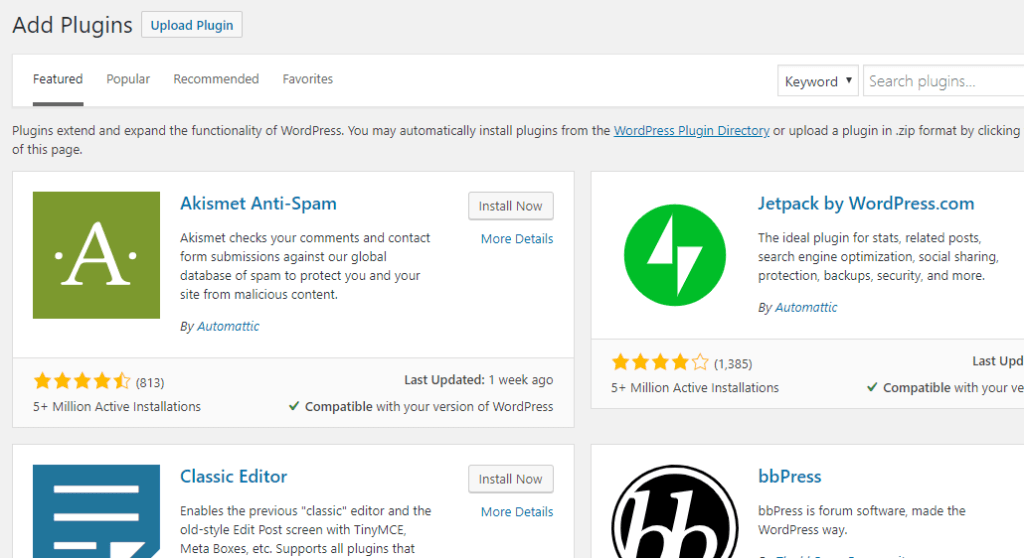
To get started, navigate to the “Plugins” tab in your WordPress administrative portal (yoursite.com/wp-admin), and click “Add New” to launch the page shown below (note, this page may change over time, but will likely look similar):
This is the Add Plugins page for WordPress that will enable you to install the dependencies for the GCPT, the GCPT itself, as well as extend your community platform with over 50,000 potential plugins, most of which are free to use!
Type BuddyPress into the “Search plugins” box shown above in the upper right corner, to search the WordPress repository for the most recent version of this core user plugin.
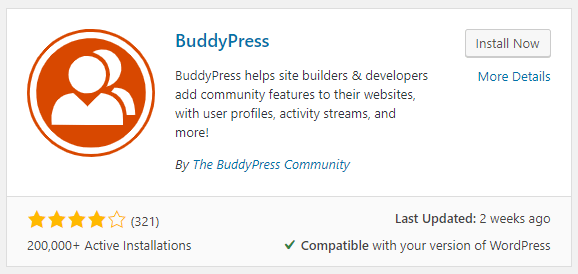
Once your search loads, click “Install Now” to install the BuddyPress dependencies. Once the installation is complete, the button will change to say “Activate.” Click “Activate”, and the plugin will begin setting up the necessary database files, and prepare you to install the GCPT.
Step 3 – Configuring BuddyPress
In order to use the free, open source Garrett County Planning Tool (GCPT) plugin, you’ll need to activate BuddyPress groups. This feature of the BuddyPress framework allows your users to be organized into groups and provides a space for the GCPT to work its magic. To enable BuddyPress groups, navigate to “Settings” -> “BuddyPress” in your WordPress administration panel (yoursite.com/wp-admin).
Ensure that the “User Groups” checkbox is active, as shown in the screen above, and optionally select any other features that you may desire.
Note, we recommend leaving private messages turned off as a spam and community control mechanism to prevent anyone from utilizing your platform for other purposes, such as solicitations, mass user mailings, etc…
Step 4 – Installing the Garrett County Planning Tool
You’re now ready to install the free, open source Garrett County Planning Tool (GCPT), and the best part is that it’s now a two-click installation! Long gone are the days of compiling source code from GitHub and complex code management. Today, you just have to follow these short steps:
Go back to your WordPress plugins page and search for Garrett County Planning Tool:
Click the “Install Now” button, and wait until the button changes to “Activate.” Click the “Activate” button, and wait for the button to say “Activated.”
That was pretty easy, right? 😉
Note, the Garrett County Planning Tool CANNOT be installed without BuddyPress installed AND active, and other GCPT plugins CANNOT be installed without the Garrett County Planning Tool installed AND active.
Step 5 – Configuring the GCPT
It’s finally time to start customizing your planning tool! To get started, head to the options page shown below by navigating to “GCPT” in the WordPress administrative panel (a new option in the left sidebar that appears after installing the GCPT plugin), and fill out as much information about your community as possible.
Note, you MUST fill out a start date in order for the plugin to work, and all data entered by users will be relational to the date set, so it is strongly recommended that the date field is not changed after launch.
Performance note, as your site grows, remember this panel. Many of these options, such as number of measures, tags, etc… can assist in performance if you end up with a viral hit on your hands.
Garrett County’s pilot started with 3 measures, then 5, then 10, and finally the full 15.
This enabled us to grow confidently, and worry less about large traffic spikes caused by highly effective marketing campaigns.
Step 6 – Extending the GCPT
Congratulations! Your planning tool is ready to go! We wish you the best of luck, and forward our sincerest appreciation for the work you’re starting to improve the health outcomes for everyone in your community.
Moving forward, we hope you check out our additional resources, and follow our blog for articles, tips, and tricks to get the most out of your GCPT.
The health of our community depends on how well we work together! Our primary purpose on the Garrett County Planning Tool is to give everyone an opportunity to share their voice by connecting to help improve the issues that matter most to all of us!
We’ve removed the obstacles of needing to be at a meeting or hold a certain agency status to participate, and expanded our conversations to include all kinds of topics that affect both our individual and community health.
Instead of waiting every three years to conduct a formal assessment, anyone is invited to speak about the issues they struggle with as well as their greatest successes at any time. This dialogic communication creates a culture of responsiveness and helps shape programs, services, and better positions stakeholders to compete for funding opportunities using the hyperlocal data reported on the Planning Tool. The insights gained from the extensive qualitative and quantitative data is vital because it helps to tell our story. In order to understand all the nuances of each person and the lived experience of our local heritage, we need opportunities to share who we are and what matters to us. In this context, data is the most meaningful if it mobilizes action. The Garrett County Planning Tool continues to demonstrate the power of transparency as it relates to both the collection and reporting of hyperlocal data to spur action.
My intention in the creation of this unique planning experience was to harness the local knowledge, care, and passion of the people in this community and turn it into a pure force for good!
Now that we have the opportunity to share this work on a global level as the Garrett County Planning Tool (mygarrettcounty.com) is released in part under GPLv3 as the Universal Community Planning Tool (UCPT) with support from the Robert Wood Johnson Foundation thru the Public Health National Center for Innovations (PHNCI), a division of the Public Health Accreditation Board (PHAB), we invite you to join our expanding UCPT family.
Here’s a shout out to all of our local planning partners, those who watch our work from afar, and those who will continue development and refinement of the initial framework to improve population health advancements for us all.
A special acknowledgment to the initial pilot cohort, five brave communities we had the privilege of teaching and mentoring.
I’m honored you’re here and deeply value your contributions to this body of work.


 population.health.blog